Up up
4.628.00Reviews
Analysis ByAppCompare
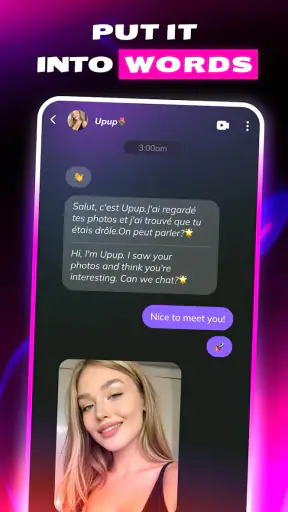
I approached Up up as a social discovery app rather than a conventional messaging tool. Its central appeal is the possibility of meeting people who enjoy humor, but that promise needs to be judged carefully: a playful theme can make first contact easier, while the mature social setting also demands sensible boundaries. After spending time with it, I see a service aimed at users who want conversations to begin with personality instead of a long profile or a formal introduction.
The app is free to install, and it sits in the Social category. CLBOM LLC is the developer, and the current release is version 1.1.2. It has already passed the early-experiment stage in terms of public attention, with more than a million installs and an average score of 4.6 from around seventeen thousand ratings. Those figures suggest that many people find the idea appealing, although they do not tell me whether every match becomes a worthwhile conversation.
What trust looks like in a humor-led social app
The first thing I would tell a friend is not to confuse a funny opening with a trustworthy relationship. Humor is useful because it lowers the awkwardness of meeting someone new, but it can also hide differences in intent. A clever profile, joke, or message may be genuine, exaggerated, or simply designed to get attention. I found that the app works best when I treat the humor as an invitation to talk, not as proof that a person is safe or compatible.
That distinction matters because this is rated Mature 17+. The age guidance places it firmly in an adult-oriented social environment, so younger users should not treat it as an ordinary general-audience chat app. For adults, the rating is a reminder to keep conversations within personal comfort levels and to avoid sharing private details merely because the exchange feels relaxed.
The store summary presents the service as a place for encountering souls with a sense of humor, while the short store phrase is simply “Up up.” I would not read either line as a detailed explanation of how interactions are managed. They communicate mood, not a complete safety model. In practical use, trust comes from watching how the app lets me choose what to reveal, how I respond to unwanted contact, and whether I can leave an interaction without pressure.
That is also why I would not compare it directly with a private messenger. A messenger usually begins with people I already know or with a contact I deliberately add. This app is built around discovery, so the unknown person is part of the experience. If you prefer predictable conversations with existing friends, a standard messaging app is the better choice. If you enjoy the uncertainty of meeting new people but want humor to be the first filter, this concept is more relevant.
Controls are more important than the first impression
When I evaluate a social app, I look for visible choices before I become invested in a conversation. The useful questions are simple: Can I decide what information goes into my profile? Can I stop replying without explanation? Can I recognize when a conversation is moving somewhere I do not want it to go? These are not exciting features, but they determine whether a discovery app feels manageable.
With Up up, I recommend taking a slow approach to profile creation. Use a light, recognizable sense of humor, but do not use your workplace, home area, daily routine, phone number, or other details that make you easy to identify outside the app. A joke can be memorable without being personally revealing. This is one of the strongest practical advantages of keeping the profile intentionally limited: you can test the social atmosphere before giving someone enough context to find you elsewhere.
I also advise reading the app’s visible account and privacy choices before starting regular conversations. I would pay attention to any settings that control profile visibility, notifications, contact preferences, or account removal. Those choices are more valuable than a polished first screen because they determine how much control remains after the initial excitement fades. If an option is unclear, I would avoid assuming what it does and would keep my activity conservative until I understand it.
There is a useful workflow here that many first-time users overlook. I would create a profile, browse the available social environment briefly, and then pause before sending personal messages. During that pause, I would decide what kind of interaction I actually want: quick jokes, casual conversation, or a longer connection. That small separation between setup and disclosure prevents the common mistake of writing a profile in the moment and then regretting how much it reveals.
Notifications deserve the same attention. A social app can pull me back into conversations at times when I am tired, busy, or less careful about boundaries. I would keep alerts limited enough that the app does not become the default place I seek stimulation. If a conversation starts to feel urgent because of repeated notifications, I would step away rather than treating speed as a responsibility.
Where personal information becomes sensitive
The most sensitive moment is not necessarily account creation. It is often the point when a stranger asks to move the conversation somewhere else. Humor can create quick familiarity, and quick familiarity can make a request seem harmless. I would not share a personal email address, phone number, private social profile, location, financial information, or intimate images simply because the exchange has been entertaining.
A safer test is to keep the conversation inside the app until the person has shown consistent respect for ordinary boundaries. If they react badly to a reasonable refusal, that reaction is useful information. I would end the interaction rather than trying to explain myself repeatedly. The ability to leave a conversation is a form of control, and I would use it early instead of waiting for an obvious crisis.
I would also be careful with photos. A picture can reveal more than the subject: street signs, school names, badges, house numbers, delivery labels, and reflections may expose details that were never intended to be public. This is especially important in a social discovery app, where the audience may include people I have never met. Before uploading anything, I would inspect the background and ask whether I would be comfortable with a stranger recognizing the setting.
Another data-sensitive moment comes when a conversation turns personal. Someone may ask where I work, whether I live alone, when I travel, or what my routine looks like. None of those questions has to be answered. A vague response is enough, and changing the subject is perfectly reasonable. I prefer to judge a contact by how they handle a small boundary rather than by how charming they are when everything goes their way.
Because Up up is free to install but includes optional in-app purchases ranging from $1.99 to $99.99 per item, I would also review purchase controls before using it heavily. The wide range means I would not tap through a payment screen casually, especially if an offer appears during an emotionally engaging interaction. I would confirm what is being bought, whether the purchase is optional for ordinary use, and whether device-level purchase authentication is enabled. Keeping spending decisions separate from social excitement is a simple but effective safeguard.
Keeping agency while meeting new people
The best way to use this app is to define my own pace before someone else defines it for me. I would decide how long I want to browse, how many conversations I can realistically manage, and which subjects are off limits. That sounds basic, but it prevents a social feed from turning into an obligation. A person who expects immediate replies is not automatically entitled to them.
For an everyday example, imagine opening the app during a lunch break and finding a conversation that starts with a genuinely funny observation. I might reply, enjoy a few exchanges, and then return to work. The healthy version of that experience is leaving with the conversation paused, not feeling required to provide my schedule or continue all afternoon. If the other person accepts the pause, that is encouraging. If they push for instant replies or personal information, I would use that as a reason to disengage.
I would keep a separate mental line between “interesting” and “reliable.” Someone can be witty and still be disrespectful. Someone can have a dull opening message and still become a thoughtful conversation partner. The humor-focused concept is a useful starting filter, but it should not become the only measure I use. In my experience, the strongest conversations are the ones where humor is accompanied by curiosity, patience, and an ability to accept no.
There is also a practical benefit to starting with low-stakes questions. Ask about a favorite kind of comedy, a harmless everyday annoyance, or a funny observation from the week. These topics reveal conversational style without requiring personal history. I would avoid turning the first exchange into an interview, but I would also avoid jumping straight into vulnerable subjects. This approach gives both people room to decide whether the interaction deserves more time.
If I wanted to meet someone offline, I would treat that as a separate decision rather than the automatic next step. I would choose a public place, tell a trusted person where I am going, arrange my own transport, and keep the first meeting short. I would not allow a funny online connection to override ordinary safety planning. If the person objects to those precautions, I would cancel.
Who will enjoy it, and who should choose something else
Up up is a good fit for adults who enjoy discovering unfamiliar people through playful conversation. It may suit someone who finds traditional profile-heavy services tiring and would rather see whether a person can make them laugh. It can also work for users who want a low-pressure way to practice starting conversations, provided they remain selective about what they disclose.
I would be more cautious recommending it to anyone seeking a tightly controlled professional network, a private family chat, or a platform where every identity is already known. Those needs are better served by a workplace community, a familiar messaging service, or a smaller group with clear membership. The uncertainty that makes this app interesting is also its main trade-off.
People who dislike mature social spaces should skip it. The age rating is not a minor label to ignore, and parents should not treat the app as suitable for children simply because the store wording sounds playful. I would also suggest avoiding it if you are currently looking for guaranteed emotional support, formal matchmaking, or a carefully moderated specialist community. A humor-led discovery app cannot replace those more focused options.
Compared with a mainstream social network, the appeal here is narrower and more immediate: the interaction begins with the possibility of personality rather than an established friend graph. Compared with a dating service, the humor angle may feel less formal, but it may also provide less clarity about what another person wants. Compared with a group chat, the experience is more open-ended and less predictable. Choosing among them depends on whether you value discovery, known contacts, or clearly defined intent.
Performance expectations and the cost of experimentation
The current version is 1.1.2, and the app was released on December 27, 2024. That places it in a relatively young phase compared with long-established social platforms. I would approach it with reasonable expectations: a newer service can feel fresh and focused, but its community habits and controls may still be developing. I would check the release notes and account settings after updates rather than assuming that the experience will remain unchanged.
It supports Android 7.0 and later, which makes it accessible to many older devices. Still, compatibility does not guarantee the same experience on every phone. On an older handset, I would watch for battery use, notification behavior, and whether switching between the app and other tasks feels smooth. If the app becomes distracting or unreliable, I would reduce notifications before deciding that I need to spend more time inside it.
The free entry point makes experimentation easy, but “free” does not mean cost-free if optional purchases become part of the routine. I would use the app without buying anything first and decide whether the basic social experience is useful. If the core activity only feels worthwhile after spending, I would reconsider whether it is the right service for me. My rule is to test the social value before paying for extra convenience.
The public response is encouraging, with a 4.6 average from roughly seventeen thousand ratings, but I would interpret that as evidence of broad appeal rather than a guarantee of a perfect personal fit. Social apps are especially dependent on timing, location, community mix, and individual expectations. A high score can tell me that many users enjoy the concept; it cannot predict whether the conversations available to me will be respectful or interesting.
My cautious verdict after using it
I like the idea behind Up up because humor can make social discovery feel less stiff. The app gives adults a reason to begin talking that is more inviting than a blank message box, and its free installation lowers the barrier to trying it. I can see it working well for someone who wants casual, personality-led conversations and is comfortable deciding carefully whom to trust.
My recommendation comes with clear conditions. I would keep my profile restrained, review every visible account and privacy choice, avoid rushing conversations off the platform, and use purchase authentication before exploring optional spending. I would also treat mature social access as a reason for stronger boundaries, not as permission to assume that every interaction is harmless.
In the end, this is not the right app for people who want certainty, known contacts, or a clearly structured purpose. It is better for curious adults who can enjoy a joke without mistaking it for a character reference. If that sounds like you, I think it is worth trying on a limited basis. The real strength is not simply finding someone funny; it is having enough control to decide whether the conversation deserves to continue.
FAQ
What is Up Up, and what can I use it for?
Up Up is a mobile app designed to provide an engaging and easy-to-use experience on Android and iOS devices. Its exact purpose and available tools may vary depending on the version installed, so it is worth checking the app description before downloading. After installation, users can explore its main features, settings, and supported functions directly from the home screen.
Is Up Up free to download and use?
Up Up may be available as a free download, but some features, content, or services could require in-app purchases or a subscription. Before confirming a payment, review the pricing information shown in the app store and inside the application. Also check whether subscriptions renew automatically, since cancellation usually needs to be completed through your Google Play or Apple account settings.
Does Up Up require an internet connection?
The internet requirements for Up Up depend on which features you use. Basic sections may work without a connection, while online content, account synchronization, updates, advertisements, or other interactive functions may require Wi-Fi or mobile data. If you plan to use the app while traveling, open it beforehand and test which features remain available offline.
Is Up Up safe for children and does it collect personal information?
Parents should review Up Up’s age rating, privacy policy, and requested permissions before allowing a child to use it. The app may collect certain technical or usage information, and some functions could involve advertising, accounts, or external links. Avoid granting permissions that are not necessary, and use device-level parental controls when additional supervision is needed.
What should I check before downloading Up Up on my device?
Before downloading Up Up, confirm that your Android or iOS version is supported and that your device has enough free storage. It is also helpful to read recent user reviews, check the developer’s update history, and verify whether the app includes advertisements or optional purchases. Download it only from the official Google Play Store or Apple App Store to reduce security risks.
Pros
- Simple interface that is easy to understand from the first launch.
- Quick to open and use
- even during short breaks.
- Lightweight design takes up little storage space.
- Smooth controls make basic interactions feel responsive.
- Suitable for casual users who want a straightforward experience.
Cons
- Limited depth may make the experience repetitive over time.
- Some features may feel too basic for experienced users.
- Requires a compatible device and supported operating system.
- The app may offer little customization for personal preferences.
- Performance can vary depending on device age and available resources.